A script becomes a tool the moment other people depend on it. This track is about the decisions that make that transition survivable: which framework to commit to, how to lay out a command tree that stays testable as it grows, and how to let features ship independently through plugins instead of accreting into one unmaintainable file.
These guides assume your project foundation is already in place. Here we focus on the shape of the code itself.
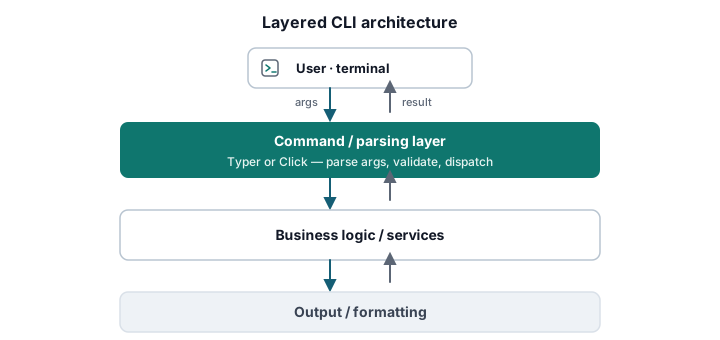
What this track covers
Picking a framework
- Typer vs Click: when to use each — type-hint inference versus explicit decorator control, test ergonomics, and the project traits that point to one framework over the other. Go deeper with building a CLI with subcommands in Click and Typer callback functions explained.
Structuring the command tree
- Structuring multi-command Python CLIs
— separate parsing, business logic, and output so commands stay testable and the tree
stays navigable. Then scale up with
how to structure a large Python CLI project
using the
src/layout, and lock in best practices for Python CLI entry points via PEP 621.
Extensibility
- Plugin architectures for extensible CLIs
— design plugin systems with entry points,
importlib.metadata, and protocol interfaces so teams can ship features against a stable API without touching the core.
A recommended path
- Decide between Typer and Click before you write the second command.
- Establish multi-command structure with clean layer separation early.
- Standardize entry points so installs behave the same everywhere.
- Reach for a plugin architecture only once the command set outgrows one team.
Related tracks
Build the foundation first in Project Setup & Dependency Management, then make the resulting commands a pleasure to use in Advanced Input Parsing & User Experience.