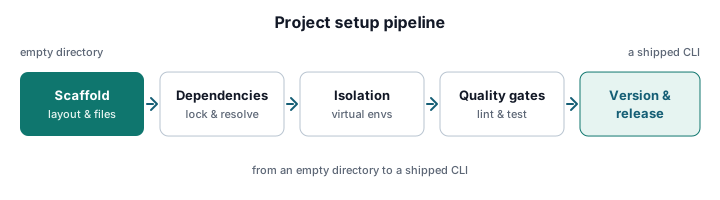
Project Setup & Dependency Management
1. Project Initialization & Directory Structure
Modern Python CLI projects require a deterministic foundation. Adopting PEP 621-compliant pyproject.toml consolidates metadata, dependencies, and build configuration into a single source of truth. This eliminates legacy setup.py fragmentation and standardizes toolchain interoperability.
Automate boilerplate generation using CLI Project Scaffolding with Cookiecutter to enforce a strict src/ layout. This structure prevents accidental import collisions during development and aligns with modern packaging standards.
Define explicit console_scripts entry points to route commands cleanly. Map executable names directly to modular Typer or Click command groups. This ensures fast startup times and predictable execution paths.
[build-system]
requires = ["hatchling"]
build-backend = "hatchling.build"
[project]
name = "data-pipeline-cli"
version = "0.1.0"
description = "Internal CLI for data ingestion and transformation"
requires-python = ">=3.10"
dependencies = [
"typer>=0.9.0",
"rich>=13.0.0",
"pydantic-settings>=2.0.0",
]
[project.scripts]
dp-cli = "data_pipeline.main:app"
2. Environment Isolation & Dependency Resolution
Deterministic builds require strict environment boundaries. Isolate CLI runtimes from host Python installations to prevent version drift and system-wide conflicts. Follow Virtual Environments & Isolation Best Practices to guarantee reproducible execution contexts across local machines and CI runners.
Leverage uv for Python CLI Dependency Management for sub-second lockfile generation. The toolchain unifies virtual environment creation, dependency resolution, and PEP 723 inline script execution. It replaces fragmented pip + venv workflows with a single, Rust-backed binary.
# Initialize project and generate lockfile
uv init --no-readme
uv add typer rich pydantic-settings
uv lock
# Sync environment to lockfile
uv sync --frozen
Evaluate Poetry Workflows for CLI Development when dependency trees require advanced constraint resolution. Poetry excels at managing complex optional dependency groups and automating PyPI publishing pipelines. Choose it when your CLI integrates tightly with enterprise artifact registries.
3. Core CLI Architecture & Framework Selection
Implement Typer for type-hinted, auto-documented command interfaces. Python 3.10+ union syntax enables precise parameter validation without boilerplate. Pydantic integration provides runtime configuration parsing and environment variable overrides.
Structure subcommands using modular package imports. Avoid monolithic script files to support parallel development and isolated testing. Each command group should reside in its own module under a dedicated commands/ directory.
Integrate Rich for progressive terminal output. Replace raw print() calls with structured tables, spinners, and styled error reporting. Implement fallback logging for production deployments where interactive TTYs are unavailable.
# src/data_pipeline/main.py
from __future__ import annotations
import typer
from rich.console import Console
from rich.progress import Progress, SpinnerColumn, TextColumn
app = typer.Typer(add_completion=True)
console = Console()
@app.command()
def ingest(source: str | None = None, batch_size: int = 100) -> None:
"""Ingest data from a specified source."""
if not source:
console.print("[bold red]Error:[/bold red] --source is required")
raise typer.Exit(code=1)
with Progress(
SpinnerColumn(), TextColumn("[progress.description]{task.description}")
) as progress:
progress.add_task("Processing batches...", total=batch_size)
# Simulate work
console.print(f"[green]✓[/green] Ingested {batch_size} records from {source}")
if __name__ == "__main__":
app()
4. Testing, Linting & Automated Quality Gates
Enforce code quality through automated pre-merge validation. Configure Pre-commit Hooks for CLI Projects to run ruff, black, mypy, and pytest on every commit. This catches regressions before they reach the main branch.
Write parameterized Pytest suites using typer.testing.CliRunner. Mock sys.argv, external API responses, and filesystem operations to validate exit codes and stdout. Assert against expected output strings rather than relying on side effects.
Implement coverage thresholds exceeding 90%. Integrate static analysis into CI pipelines to block merges on type violations or linting failures. Treat CLI output as a public contract; test it rigorously.
# .pre-commit-config.yaml
repos:
- repo: https://github.com/astral-sh/ruff-pre-commit
rev: v0.4.0
hooks:
- id: ruff
args: [--fix]
- id: ruff-format
- repo: https://github.com/pre-commit/mirrors-mypy
rev: v1.9.0
hooks:
- id: mypy
additional_dependencies: [pydantic, typer]
# tests/test_cli.py
from typer.testing import CliRunner
from data_pipeline.main import app
runner = CliRunner()
def test_ingest_requires_source() -> None:
result = runner.invoke(app, ["ingest"])
assert result.exit_code == 1
assert "Error:" in result.stdout
def test_ingest_success() -> None:
result = runner.invoke(app, ["ingest", "--source", "s3://bucket/data"])
assert result.exit_code == 0
assert "✓ Ingested 100 records" in result.stdout
5. Packaging, Distribution & Release Management
Transform source code into distributable artifacts using standardized build tools. Automate semantic versioning and release note generation via Managing CLI Versioning & Changelogs integrated with GitHub Actions or GitLab CI.
Build wheels and source distributions using hatchling or build. Publish to PyPI or private artifact registries with twine. Verify package integrity before distribution using pip-audit or safety.
Generate standalone executables for air-gapped enterprise deployments. PyInstaller or cx_Freeze bundle the Python interpreter and dependencies into a single binary. This eliminates runtime environment requirements on target hosts.
# Build distribution packages
python -m build
# Publish to PyPI
twine upload dist/*
# Create standalone executable (Linux/macOS/Windows)
pyinstaller --onefile --name dp-cli src/data_pipeline/main.py
6. Cross-Platform Execution & System Integration
Ensure reliable CLI behavior across Linux, macOS, and Windows. Address path separators, line endings, and shell quoting differences by following Cross-Platform Compatibility & OS Integration guidelines. Use pathlib exclusively for filesystem operations.
Implement graceful signal handling for long-running data pipelines. Capture SIGINT and SIGTERM to flush buffers, close connections, and exit with appropriate status codes. Prevent orphaned processes and corrupted state files.
Register shell completion scripts during installation or first-run initialization. Typer natively supports bash, zsh, fish, and PowerShell completion. Generate and install scripts programmatically to enhance developer ergonomics.
# src/data_pipeline/utils/signals.py
import signal
import sys
from rich.console import Console
console = Console()
def handle_shutdown(signum: int, frame: object) -> None:
console.print("\n[yellow]Interrupt received. Flushing buffers...[/yellow]")
# Cleanup logic here
sys.exit(0)
signal.signal(signal.SIGINT, handle_shutdown)
signal.signal(signal.SIGTERM, handle_shutdown)