When you install a Python CLI with plain pip install, its dependencies land in whatever
environment you happened to be in — often your system Python — where they collide with the
next tool's dependencies. pipx fixes this: it gives every CLI its own private virtual
environment and links just the command onto your PATH. You get global commands with zero
dependency conflicts. This guide covers the isolation model, the day-to-day commands,
installing from a wheel/git/PyPI, and when to reach for pipx versus a plain venv.
TL;DR
- One venv per tool, one command on your PATH.
pipx install blackputs Black in its own environment and exposes only theblackcommand. pipx runfor one-offs.pipx run cowsay Hellofetches, runs in a cache, and leaves nothing installed.pipx injectto add plugins into a tool's private environment without touching your own.- Pin and upgrade explicitly.
pipx install "httpie==3.2.2"pins;pipx upgrade httpiebumps;pipx upgrade-allmaintains everything. - Run
pipx ensurepathonce so the linked commands are actually found.
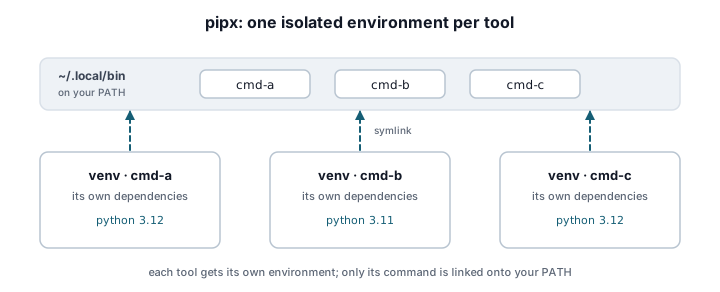
What pipx is and the isolation model
pipx is a tool for installing and running Python applications — programs you invoke by name,
not libraries you import. Its whole design is one idea: isolate the environment, expose the
command. For each package you install, pipx creates a dedicated virtual environment under
~/.local/pipx/venvs/<name>/, installs the package and its dependencies there, then creates a
symlink (or a small launcher on Windows) in ~/.local/bin/ pointing at each console entry
point the package declares.
The payoff is that two tools with conflicting requirements — say one needing rich<13 and
another needing rich>=14 — coexist happily because neither can see the other's dependencies.
It is the same principle as the isolated venvs in
virtual environments and isolation best practices,
automated for the specific case of installing command-line applications. Those console entry
points are exactly the ones you declare in [project.scripts], covered in the
packaging overview.
Install pipx itself (it is deliberately kept outside the environments it manages):
$ python -m pip install --user pipx
$ python -m pipx ensurepath      # add ~/.local/bin to PATH; restart your shell after
On macOS brew install pipx and on recent Debian/Ubuntu apt install pipx also work.
PATH setup with pipx ensurepath
The single most common "pipx installed it but the command isn't found" problem is that
~/.local/bin is not on your PATH. pipx ensurepath edits your shell profile to add it and
tells you to restart the shell:
$ pipx ensurepath
Success! Added /home/you/.local/bin to the PATH environment variable.
You will need to open a new terminal or re-source your shell configuration...
Run it once per machine. In a Dockerfile or CI job where you cannot "restart the shell," set the variable directly instead:
ENV PATH="/root/.local/bin:${PATH}"
Install, list, upgrade, uninstall
The core lifecycle is four commands. Everything else is a variation on these.
$ pipx install httpie            # create a venv, install, link the `http` command
$ pipx list                      # show every installed app, its version, and its commands
$ pipx upgrade httpie            # reinstall the latest compatible version in its venv
$ pipx uninstall httpie          # remove the venv and the linked commands
pipx list is worth knowing well; it prints the Python version each venv uses and the exact
commands exposed, which is how you discover that installing httpie gave you the http and
https commands rather than an httpie command:
$ pipx list
venvs are in /home/you/.local/pipx/venvs
   package httpie 3.2.2, installed using Python 3.12.3
    - http
    - https
To keep everything current in one shot, pipx upgrade-all. To rebuild every environment
against a new Python after an interpreter upgrade, pipx reinstall-all --python 3.13.
Pinning versions and choosing the interpreter
pipx install accepts any pip requirement specifier, so pinning is just standard version
syntax. Pin when you need reproducibility — CI, or a tool whose latest release broke you:
$ pipx install "httpie==3.2.2"          # exact pin
$ pipx install "ruff>=0.6,<0.7"         # compatible range
Pick the interpreter a tool runs on with --python. This is how you keep a legacy tool on
3.11 while your default is 3.13, or test a tool across interpreters:
$ pipx install --python 3.11 some-legacy-cli
$ pipx install --python /usr/bin/python3.13 my-cli
Because each install is a full environment, the pin sticks: pipx upgrade will not move a tool
off a version you pinned unless you reinstall without the constraint.
Installing from a wheel, a git URL, or PyPI
pipx installs from anywhere pip can, which makes it the natural way to hand someone a tool at any stage of its life.
# From PyPI (the published, public case)
$ pipx install greet-cli

# From a locally built wheel — great for sharing a pre-release
$ pipx install ./dist/greet_cli-0.1.0-py3-none-any.whl

# From a git repository, no release required (installs from a branch or tag)
$ pipx install "git+https://github.com/ada/greet-cli.git@main"

# From a subdirectory of a monorepo
$ pipx install "git+https://github.com/ada/tools.git#subdirectory=greet-cli"
The wheel case pairs directly with
building wheels and sdists for Python CLIs:
build the wheel, pipx install ./dist/*.whl, and you have verified the entire packaging chain
end to end without touching a package index. The git case is the fastest way for a colleague to
try your main branch before you have published anything to PyPI.
pipx run: tools you use once
Some tools you need exactly once — a project scaffolder, a one-off formatter, a diagnostic.
Installing them permanently is clutter. pipx run fetches the package into a temporary cache,
runs it, and installs nothing into your set of managed apps:
$ pipx run cowsay -t "shipped it"
$ pipx run --spec "cookiecutter" cookiecutter gh:audreyfeldroy/cookiecutter-pypackage
Use --spec when the command name differs from the package name, or to pin the one-off run
(pipx run --spec "black==24.8.0" black .). The cache is reused for a while, so a repeated
pipx run of the same tool is fast on the second call. This is the mechanism behind the
"just run it" instructions in
CLI project scaffolding with Cookiecutter.
pipx inject: adding plugins to a tool
Some CLIs load plugins that must live in the same environment as the tool — think a mkdocs
theme or a pytest plugin you want globally. pipx inject installs extra packages into an
existing app's private venv without polluting your own environment:
$ pipx install mkdocs
$ pipx inject mkdocs mkdocs-material          # add the theme into mkdocs' venv
$ pipx inject mkdocs mkdocs-material --include-apps   # also link any new commands
Without --include-apps, injected packages are importable by the tool but their own commands
are not linked onto your PATH — which is usually what you want for a pure plugin.
When pipx, and when a plain venv
pipx is the right tool when the thing you are installing is an application you run by name and want available everywhere. Reach for a plain project virtual environment instead when:
- You are developing the CLI, not just running it — you want an editable install
(
pip install -e .oruv pip install -e .) inside a project venv so code changes take effect immediately. - The tool is a library other code imports; pipx is for commands, not
importtargets. - You need the tool's dependencies available to your project's code, not sequestered in a private environment.
There is also a fast-moving alternative in the same niche: uv tool install does what pipx install does using uv's resolver and shared cache. The trade-offs are worth understanding
before you standardize a team on one; see
uv tool install vs pipx for CLIs.
Production notes
- Document pipx as the install path in your README. For a published CLI,
pipx install your-cliis the recommendation that spares users the "it broke my system Python" class of bug. Showpipx run your-clitoo for the try-before-you-commit case. - CI has no interactive shell. Prefer setting
PATHexplicitly over relying onensurepath, and pass--pythonto pin the interpreter so builds are reproducible. pipx runpip <app> ...reaches into a tool's venv to inspect or debug it (e.g.pipx runpip httpie freeze) without breaking its isolation.- Reinstall after a Python upgrade. A venv built against a Python that gets removed will
break;
pipx reinstall-allrebuilds them against your current interpreter. On distros that upgrade system Python underneath you, this is the fix for "all my pipx tools stopped working." - Environment location is configurable.
PIPX_HOMEandPIPX_BIN_DIRrelocate the venvs and the linked commands — useful for shared or read-only-home CI images.
Related
- Packaging Python CLIs for Distribution — the overview this guide sits under.
- Building wheels and sdists for Python CLIs — produce the wheel you install from disk.
- Publishing a Python CLI to PyPI — so
pipx install your-cliresolves for everyone. - uv tool install vs pipx for CLIs — the faster uv-based alternative and its trade-offs.
- Virtual environments and isolation best practices — the isolation model pipx automates.